

There’s a special kind of remote-work anxiety that only tiny house owners know: you’re about to present to the board, and your “office” is six feet from your bed, four feet from your kitchen, and currently doubling as the laundry drying zone. Our cool office ideas guide covered creative setups — this one is about something narrower and more valuable: designing a tiny house home office that looks, sounds, and feels professional on camera and in practice.
Because “professional” in a tiny house isn’t about square footage — it’s about three things clients and colleagues actually perceive: what they see behind you, what they hear, and how you show up (which starts with ergonomics). This guide covers video-call-ready background design, acoustic treatment for thin walls, lighting that flatters on camera, ergonomic setups in 20 square feet, and the psychological boundaries that keep work from swallowing your home.
The Camera Sees 4 Feet: Design the Background First
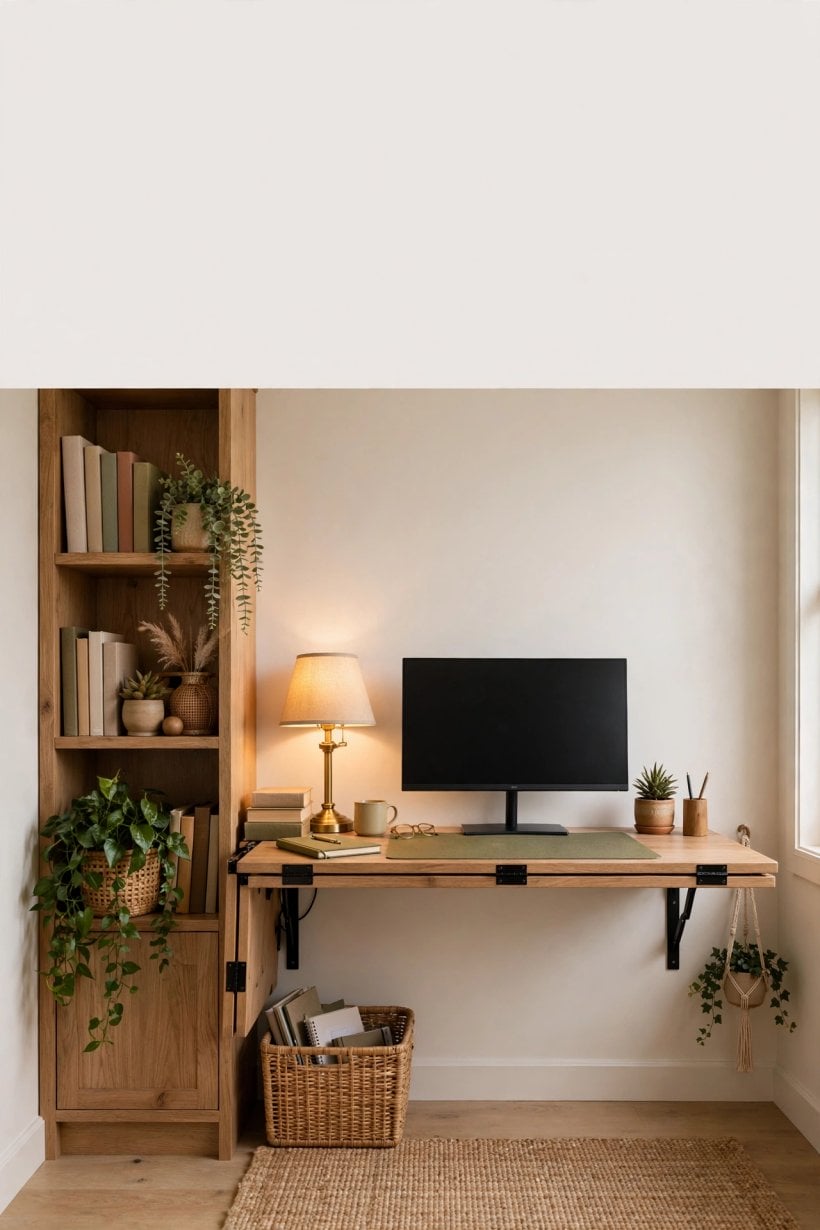
On video calls, your office is a 4-foot-wide rectangle behind your head. Design that rectangle deliberately:
- Depth over flatness: sit 3–4 feet from the background, not against the wall — depth reads as professional, flat reads as closet.
- Three objects, varying heights: a plant, a bookshelf section, one piece of art. Curated, not decorated — the goal is “competent human,” not “lifestyle influencer.”
- Brand-neutral palette: keep the background in your home’s palette (see our paint color guide) but slightly calmer — busy patterns shimmer on camera.
- Hide the domestic: the bed, the dishes, the drying rack — all outside the frame. A folding screen or curtain on a ceiling track creates an instant “office wall” that vanishes after hours.
- Lighting the background: a small warm lamp or LED strip behind you (bias lighting) separates you from the background and kills the flat webcam look.
Acoustics: Sounding Professional in Thin Walls
Tiny houses are acoustically honest — every keystroke, kettle, and neighbor dog is audible. Fix it in layers:
- Microphone first: a decent USB mic or headset mic matters more than any room treatment. The mic 6 inches from your mouth hears you, not the room.
- Soften reflections: rugs, curtains, upholstered furniture, and bookshelves break up the hard parallel surfaces that make small rooms sound echoey. A tiny house full of soft things sounds bigger than it is.
- Seal the gaps: door sweeps and weatherstripping cut more noise than you’d expect — most sound leaks through gaps, not walls.
- Schedule around noise: know your noise profile (neighbor’s dog at 5pm, highway hum at rush hour) and schedule important calls around it. Low-tech, highly effective.
- The mute discipline: in a house where life happens 10 feet away, aggressive muting isn’t rude — it’s professional.
Lighting for Camera (and for Your Eyes)
- Face the window: the single best video light is a window in front of you, not behind you. Backlit = silhouette.
- Key light: a daylight-balanced (5000K) LED panel or ring light at 45° fills what the window misses. $30–$60 transforms your on-camera presence.
- Eliminate overhead-only lighting: a single ceiling light creates under-eye shadows. Layer: window + key light + warm background accent.
- For your eyes: bias lighting behind the monitor reduces eye strain in dark rooms; a proper desk lamp prevents the hunched squinting that ruins posture.
Ergonomics in 20 Square Feet
Professional means sustainable — a setup that injures you isn’t professional, it’s a countdown. The non-negotiables, tiny-scaled:
- Monitor at eye level: a laptop on a stand + external keyboard, or a monitor arm — never hunch to a flat laptop for 8 hours.
- Chair that fits: a proper task chair is the highest-ROI office purchase. If space forbids it, a kneeling chair or active stool beats a dining chair.
- Sit-stand, tiny edition: a desktop riser on a fold-down wall desk gives you standing hours without a standing desk’s footprint.
- Footprint discipline: a complete ergonomic workstation fits in a 4×5-foot zone — wall-mounted fold-down desk, task chair that tucks fully under, monitor arm reclaiming desk depth.
- Movement: in a tiny house you’re never more than 20 steps from anywhere — use it. Walking meetings, stretch breaks, and the sheer necessity of moving between zones are ergonomic features, not bugs.
Psychological Boundaries: Keeping Work From Eating Home
The real tiny-office challenge isn’t physical — it’s that work never leaves. Design boundaries:
- The shutdown ritual: fold the desk, close the screen, draw the curtain — a physical action that ends the workday. Remote workers without commutes need manufactured transitions.
- Visual separation: when the office is packed away, the home should look like a home. If you can see your monitor from the sofa, you’ll check email at 10pm.
- Sound boundaries: noise-canceling headphones aren’t just for calls — they’re a “do not disturb” sign in a house without doors.
- Two-person households: stagger schedules or zone the house (one takes calls in the loft, one at the desk). The couples who survive tiny remote work negotiate this explicitly.
Room-by-Room Backgrounds: Living Area, Loft, and Kitchen-Table Setups
Your “office” in a tiny house is wherever the laptop lands. Each spot has a different background problem to solve.
Living area desk. The most common setup — and the hardest to keep professional, because the couch, the TV, and daily life are all in frame. The fix is a dedicated backdrop wall: even a 4-foot-wide section styled intentionally (shelf, art, plant) reads as an office on camera. Position the desk so the camera faces the styled wall, never the kitchen or the bed. A room divider screen behind you works when the wall itself cannot be styled.
Loft workspace. Lofts make surprisingly good offices: the low ceiling feels cocoon-like, and the separation from the living area creates a psychological commute (climb up = work mode). The challenges are heat (warm air rises — ventilate), lighting (add a dedicated desk lamp; loft lighting is usually ambient and dim), and camera angle (a laptop on a low loft desk shoots up your nose — raise it on a stand and use an external keyboard). Check headroom: you need 30 inches above the desk for comfortable sitting.
Kitchen-table command post. The fallback that becomes permanent for many. Make it work with a “work box” — a single attractive container holding laptop stand, headset, notebook, and chargers. At day’s end everything goes in the box and the table becomes a table again. The ritual matters more than the furniture: in a tiny house, the workday ends when the box closes.
Audio Gear for Thin Walls: Mics That Reject Echo
Tiny houses are echo chambers: hard surfaces, small volumes, and thin walls that carry sound to neighbors. Your microphone choice matters more than your webcam. Dynamic microphones (the broadcast style) reject room echo far better than condenser mics — they hear your mouth and little else. A $70–$120 USB dynamic mic is the single biggest audio upgrade for tiny-house workers, outperforming $300 condenser setups in reflective rooms.
Headset versus standalone: headsets win for calls in shared or thin-walled spaces because the mic sits at a fixed distance from your mouth and the earcups reduce how loudly you speak. Look for headsets with a noise-canceling boom mic — the mic cancels the room, and sidetone (hearing yourself in the earcups) keeps you from shouting. For neighbors’ sake, add a soft rug under the desk area and consider acoustic panels on the wall behind you; they cut both the echo your mic picks up and the sound that leaks through the wall.
Internet Redundancy: Hotspot, Starlink, and Park WiFi
Remote work dies without internet, and tiny houses often sit where internet is weakest. Build redundancy in layers. Layer one: park or home broadband where available — fastest and cheapest, but shared and sometimes throttled. Layer two: a dedicated mobile hotspot on a different carrier than your phone. Two carriers means one carrier’s dead zone is not your dead zone; a 100GB hotspot plan runs $50–$90 a month and handles video calls fine. Layer three: Starlink. At $120 a month plus hardware, it is the expensive backstop — but for rural tiny houses it is often the only primary option, not a backup. Roam plans let it travel with a THOW.
The pro setup: a dual-WAN router ($150–$250) that bonds or fails over between connections automatically. When the park WiFi drops mid-presentation, the hotspot takes over in seconds and nobody notices. Test the failover before you need it — the one time you do not want to discover a configuration problem is during a client call.
The $150 Ergonomic Comfort Package
Eight hours a day in a bad chair in a tiny house will injure you faster than in a big one, because there is no couch to migrate to. The $150 package: a refurbished ergonomic task chair from an office liquidator ($75–$100 — steelcase and Herman Miller chairs from the 2010s outperform every new $150 chair), a laptop stand ($20) to bring the screen to eye level, an external keyboard and mouse ($30 combined), and a footrest ($15) if your feet do not reach the floor. That is the complete ergonomic workstation for the price of one “gaming chair.”
The two rules that matter: screen top at or slightly below eye level, and elbows at roughly 90 degrees. Everything else is refinement. And stand up: a $0 solution — set a timer for 50 minutes, stand and move for 10. In a tiny house you can do a full lap of the property in those 10 minutes, which beats any standing desk.
Boundary Rituals That End the Workday
When home and office share 200 square feet, the workday does not end — it just fades, and the fading is corrosive. Build hard edges with rituals. The shutdown ritual: close every work tab, write tomorrow’s top three tasks on paper, say “shutdown complete” out loud (it sounds silly; it works), and physically put the work gear away — laptop in the drawer, work box closed, desk cleared. The transition ritual: change clothes, step outside for five minutes, or take the lap around the property. Your brain needs a commute, even a 60-second one.
Protect the ritual with rules: no work apps on the phone after hours (or a separate work profile that gets disabled), no “quick checks” of email from the couch, and a hard stop time that housemates respect. The tiny house amplifies both work and rest — the rituals decide which one wins the evening.
Power and Cable Management in 40 Square Feet
A tiny office concentrates a surprising electrical load: laptop (65W), two monitors (50W), desk lamp (10W), phone charger, printer, space heater in winter (1,500W — the elephant in the room). Map your circuits before you plug in: most tiny-house rooms share a single 15-amp circuit (1,800W max), and the heater plus everything else will trip it. Put the heater on its own circuit or run it on low.
Cable management is visual sanity in a small room. One 6-outlet surge protector mounted under the desk, cables bundled with velcro ties (never zip ties — you will reconfigure), and a single cable spine down to the floor outlet. Label both ends of every cable; in a year you will not remember which black brick powers what. Total cost under $40, and the difference between a workspace and a wire nest.
The Standing-Desk Question in 40 Square Feet
A full standing desk rarely fits a tiny office, but the health case for not sitting all day is real. The compromises that work: a desk converter ($120–$200) that sits on your existing desk and lifts the monitors and keyboard — it needs 30 inches of desk depth, which most tiny desks have. Or the poor-man’s version: a sturdy box or shelf at standing height for the laptop during calls, used 20 minutes at a time. Or skip the desk entirely and take walking meetings — in a tiny house, pacing the property during calls is the standing desk. The research consensus is that posture variety matters more than standing per se; three position changes a day beats eight hours at any single perfect desk.
Pro tip: keep a pair of indoor shoes or slippers strictly for work hours and change out of them at shutdown. It sounds trivial, but the physical cue reinforces the boundary ritual — your brain learns that the shoes coming off means the workday is over.
Frequently Asked Questions
How do I make my tiny house office look professional on video calls?
Design the 4-foot background rectangle: sit 3–4 feet from it for depth, three curated objects at varying heights, calm palette, domestic life out of frame, and a warm bias light behind you. Face a window and add a $30–$60 key light.
How do I reduce echo in a tiny house office?
Microphone close to your mouth first (matters most), then soften the room: rugs, curtains, bookshelves, upholstered furniture. Seal door gaps with sweeps — most noise leaks through gaps, not walls.
Can you fit an ergonomic office in a tiny house?
Yes — a complete ergonomic workstation fits in 4×5 feet: wall-mounted fold-down desk, external monitor at eye level, task chair that tucks under, monitor arm for depth. Add a desktop riser for sit-stand.
How do two people work remotely in a tiny house?
Zone and schedule: separate call zones (loft vs. desk), staggered meeting times, noise-canceling headphones as “do not disturb” signals, and explicit negotiation about who takes calls where. It works with rules; it fails on assumptions.
How do I separate work and life in a tiny house?
A physical shutdown ritual (fold desk, close screen, draw curtain), visual separation (no visible monitor from the sofa), and manufactured transitions to replace the commute. If work is visible, work continues.
Final Considerations
A professional tiny house office isn’t a room — it’s a system: a background that says competent, audio that says clear, lighting that says present, ergonomics that say sustainable, and boundaries that say the workday ends. Build the system and nobody on your calls will ever guess the square footage. They’ll just notice you show up well — which was the entire point.

0 Comments